Domain Lookup Details Explained: Records, Ads and Limits
November 18, 2026

At the end of 2025, the internet held 386.9 million registered domain names across all top-level domains, an increase of 8.4 million, or 2.2%, in a single quarter, according to Verisign's domain name industry brief. That figure explains why a lookup feels simple and then isn't. Every one of those names carries a registration record, most publish DNS records, a large share sit behind a storefront, and some are running ads right now.
Those facts come from different systems, refresh at different speeds, and each proves something narrower than people assume. A creation date doesn't tell you who runs the site. A missing registrant field doesn't mean nobody owns the domain. A live ad doesn't mean the store is selling.
A domain lookup is not one answer. It's several evidence layers stacked together, and the most common mistake is reading one layer as though it settled the rest. This guide takes them in order, shows what each one proves, and shows exactly where it stops.
Table of Contents
- Domain Lookup Details at a Glance
- Registration Fields Behind Every Domain
- DNS Records and What Each One Reveals
- Store and Advertising History in Brand Lookups
- What Lookup Details Cannot Prove
- Lookup Outcomes and How to Read Them
- Country-Code Domains and Regional Coverage
- Run a Lookup Checklist Before You Rely on Results
Domain Lookup Details at a Glance
A domain lookup returns five broad categories of detail, and each category has its own primary source. Knowing which source answers your question saves you from reading a registration record when what you needed was an ad history.
| Category | Typical fields | Primary source | Question it answers |
|---|---|---|---|
| Registration | Registrar, status flags, created and expiry dates, nameservers | RDAP or WHOIS from the registry or registrar | Who registered the domain and how long it has been held |
| DNS records | A, AAAA, CNAME, MX, NS, TXT answers and TTL | Authoritative DNS answers through trusted resolvers | Where the domain points and how email is routed |
| Store and platform | Live storefront, platform, store age | Store check on the landing domain | Whether a real store sits behind the domain and what runs it |
| Advertising history | Advertising start date, live ads, launches, stopped ads | Public Meta Ad Library | Whether the brand is advertising now and how its activity has changed |
| Other channels | Ad channels seen through homepage tracking pixels | Homepage markers on the store | Which other ad channels the brand appears to use |
Choosing the right layer before you read any detail
Read the table as a routing guide. Due diligence starts with registration, because that layer tells you who handles the domain, when it was created and whether it is locked. Prospecting starts with advertising history, because that layer shows what a brand is doing right now. Email problems start with MX and TXT records, which reveal where mail is routed and what policy the domain publishes.
The namespace itself sets the expectation. Most of it sits in a small set of generic extensions, while country-code extensions hold a large share of registrations, so the ending of a name carries market context alongside the name itself. A lookup system has to tell hundreds of millions of names apart and still read meaning into a two-letter suffix.
Coverage matters just as much. A lookup built around one market can return nothing for a brand outside it, and that empty field reflects where the source stops, not proof that the brand is inactive. The same applies to a hidden registrant or a missing pixel: a gap in one layer is a prompt to check another source, not a settled answer.
No single category proves another. Registration does not prove a business exists, a storefront does not prove the ads are profitable, and an ad history does not prove ownership.
Registration alone never demonstrates that a domain hosts an active business, and a blank field never demonstrates absence on its own. Each layer marks exactly where its evidence ends and where a different check has to begin.
Registration Fields Behind Every Domain
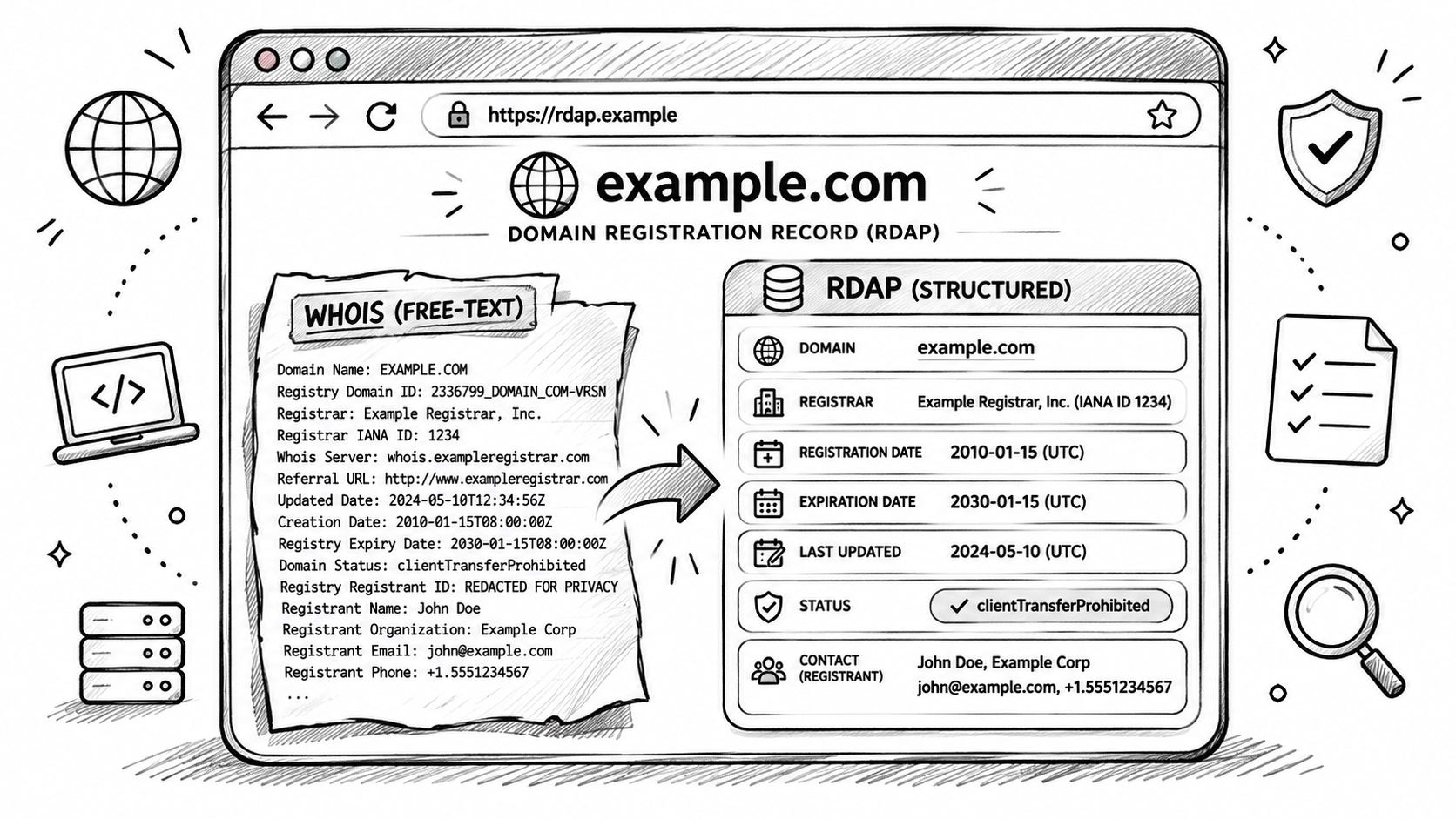
Registration data used to arrive as one block of free text, and every tool parsed that block slightly differently. RDAP changed the format. ICANN describes RDAP as the standardized replacement for WHOIS, returning registration data through structured query and response formats over a RESTful service built on IETF STD 95 (ICANN's RDAP overview). A WHOIS reply works like a handwritten note. An RDAP reply works like a form with printed boxes. The label on each box is part of the answer, so you are not guessing which sentence meant the expiry date.
The diagram below shows the same domain rendered both ways.
Reading a record from top to bottom
Start with the domain object, including its internationalized form where one exists. Then note the registrar that sold the registration and, where the record shows it, the registry behind the extension. Those two parties are easy to mix up. The registrar is the company the registrant bought the name from. The registry operates the extension itself. They hold different data and follow different rules.
Status values come next. Readers often skip them, yet a flag such as clientTransferProhibited means the name is locked against transfer. That lock is ordinary for an active business and less typical for a name parked for resale. It proves a lock is set. It does not prove who set it, or why.
Events follow: registration and expiration timestamps, each dated separately. A creation date proves when this registration object was created at the registry. It does not prove when a shop, product line, or company started.
Nameservers in the registration record are the delegation the registry publishes. They name who is supposed to answer for the zone. They do not, by themselves, show the answers that server is giving right now. A secure-DNS indicator shows whether the domain is signed. Entity roles (registrant, administrative, technical, abuse) say which party a field belongs to. Those roles stay meaningful even when the values behind them are withheld.
A blank contact is not the same thing as "nobody is there." Redaction, a privacy service, or a field the registry does not publish can all leave a box empty. An empty box is a reason to check a different evidence layer, such as the storefront or a public ad record, rather than proof that the party is absent.
How a client finds the right server
RDAP bootstrap lets a client discover the authoritative RDAP service for a given top-level domain instead of hard-coding one provider. That matters because a .com and a .de are served by different operators with different rules. For generic TLDs, registries and registrars must provide RDAP under the gTLD RDAP Profile. After RDAP became required, WHOIS obligations were substantially reduced, with specified exceptions.
Two dates that change how you read a brand
Say a store's About page claims a 2019 launch and the creation date reads 2024. That gap does not prove deception. It does show that the registration, the storefront, the brand story, or the ownership changed more recently than the marketing implies. Treat the dates as two layers that disagree, then check the layer that can explain the gap. An expiry a few weeks out is a different signal: watch the renewal. A short remaining term is not proof the site has been abandoned.
Practical rule: copy the fields into your notes before you interpret anything. A record you cannot compare later is a record you will pay to look up again.
The field list worth keeping for every domain you review:
- Domain object: the queried name plus any internationalized representation.
- Registrar and registry: both identities, kept separate.
- Status values: transfer locks and other flags, read as listed.
- Events: registration and expiration dates.
- Nameservers: the published delegation.
- Secure DNS: whether signing is indicated.
- Entities and redactions: roles present and roles withheld. A withheld role is a missing layer, not a finding that the role is empty.
- Provenance: source server, HTTP status, retrieval time.
DNS Records and What Each One Reveals
A domain lookup answers two questions that happen to share a name. One is where the name points, which is DNS. The other is who registered it, which is registration data. They're separate authoritative systems with separate failure modes, and mixing them up is where most confusion begins. RFC 1034 sets out the DNS concepts and facilities while RFC 1035 specifies implementation details and standard query behavior (IETF RFC 1034).
Resolve several record types, not just one. An A record alone says very little about a modern storefront, because most of them sit behind a platform or a content network.
| Record type | What it returns | What it tells you | Watch for |
|---|---|---|---|
| A | IPv4 address | Where the hostname points | Shared hosting or a CDN can hide the origin server |
| AAAA | IPv6 address | An IPv6 endpoint is configured | A missing AAAA record does not mean the site is offline |
| CNAME | Canonical name alias | The name is delegated to another host or platform | It cannot sit alongside other record types at the same name |
| MX | Mail host name and priority | Where email for the domain is routed | Lower priority numbers are tried first |
| NS | Authoritative name server names | Who hosts the DNS zone | Changes can take time to appear because of TTL caching |
| TXT | Text strings | Verification tokens and email policy such as SPF and DMARC | Values can be long and need careful reading before drawing conclusions |
Why TTL decides what you're actually looking at
Every record carries a time to live, and resolvers cache positive answers for that long. Change a nameserver and the old answer can keep circulating for hours or days, depending on what TTL the zone published. Negative answers cache too, under separate negative-caching rules, so an NXDOMAIN you see now may have been generated before a record was added.
That has a practical consequence. If two people run the same lookup an hour apart and get different answers, caching is the first explanation to check, not fraud. Wait out the TTL and query again before you build a theory on the difference.
The rule that keeps you honest
A single resolver response is evidence of observed DNS state. It is not permanent proof of ownership, hosting or service availability. A store can be down while DNS resolves perfectly, and a domain can resolve while nobody is home.
Query from a trusted recursive resolver, preserve the raw response, and compare a second vantage point when the answer matters. A mismatch you can document is worth more than an answer you can't.
For each query, capture the fully qualified domain name you asked about, the record type, the answer values, the authoritative nameserver set, the TTL, the response code and the timestamp. Then distinguish four different failures that all look like nothing: a DNS failure, a timeout, an empty answer and an authoritative denial. They mean different things and each sends you to a different next check.
Store and Advertising History in Brand Lookups
Say a domain turns up in an ad you saw this morning. Registration tells you when the name was created. DNS tells you it points at a storefront platform. Neither tells you whether a real store sits behind it or whether the brand is still spending money.
That's the advertising layer, and it's built from checks rather than one query.
Here is the shape of that check.
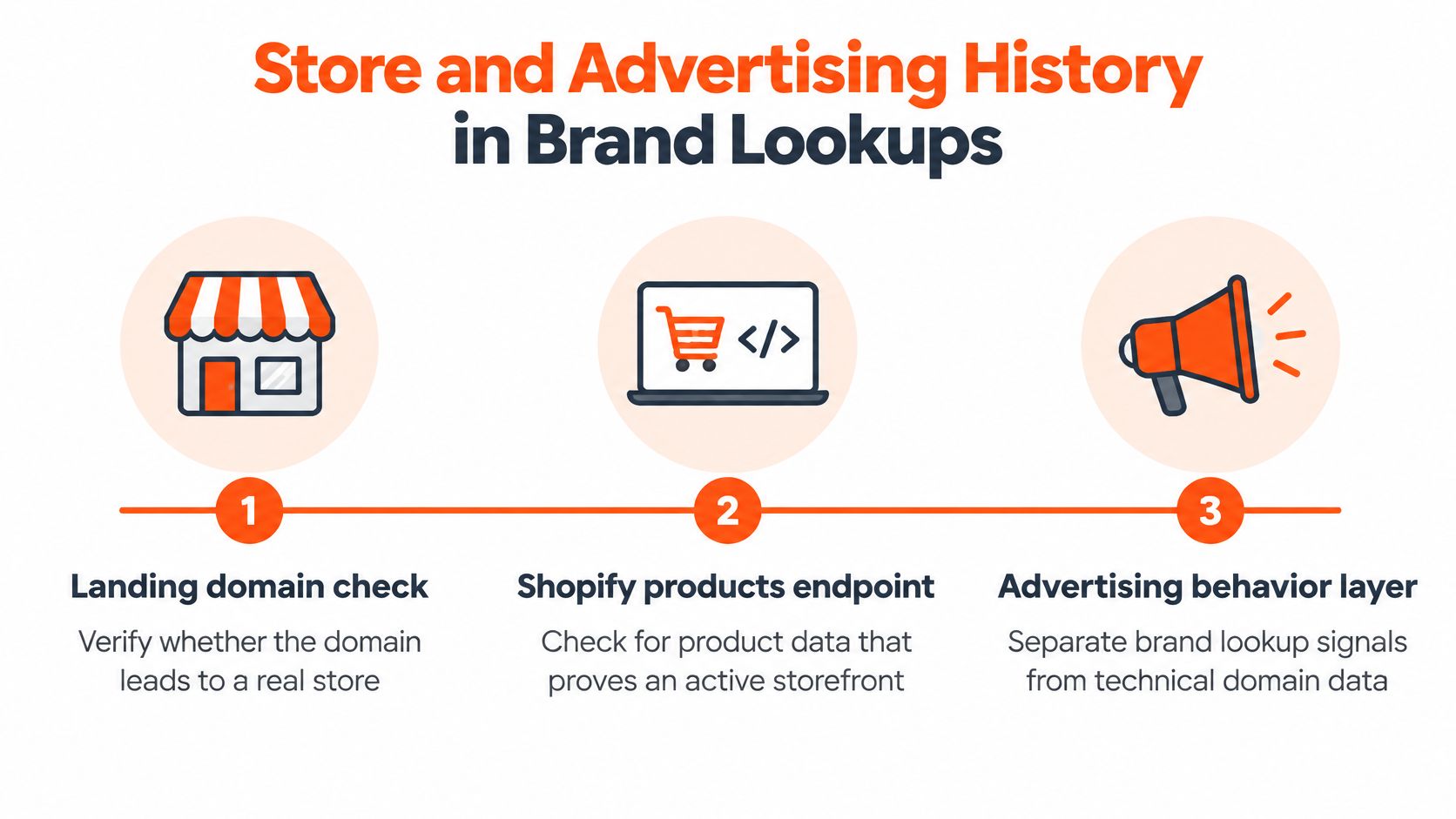
Landing domain check. Every landing domain in the ads AdvertiserLeads sees gets a store check using Shopify's /products.json endpoint and response headers, then markers on the homepage. A products endpoint that returns a catalog is strong evidence of a live storefront, response headers name the platform running it, and homepage markers confirm the page a shopper lands on.
Other channels. The same store check reads the tracking pixels on each store's homepage, which is how AdvertiserLeads sees other ad channels. A pixel for a second ad platform is a useful signal that a brand is spreading spend beyond Meta, and it costs nothing extra to capture.
What the advertising layer records
The data comes from the public Meta Ad Library, checked daily, with each advertiser matched to its online store. Each brand profile then carries its advertising start date, live ad count, launches, stopped ads and historical activity. The catalog size and price range sit alongside, so a single brand view covers both the commercial behavior and the store behind it.
A short walkthrough shows how the fields get read.
Reading the lifecycle in order
Signals only make sense as a sequence, because each one describes a change rather than a state.
- New. A new advertiser has an earliest discoverable ad within the previous fourteen days, and older ads still listed in the libraries are checked first so an established brand doesn't get flagged by a fresh campaign.
- Scaling. Ad volume rises sharply over a short window, usually alongside new creative variants.
- Struggling. Frequent launches with few ads surviving beyond two weeks, which often points at an offer or landing page problem rather than a budget problem.
- Stopped. A move from active ads to zero, which is the clearest event of the four and the easiest to misread.
Run a worked timeline. A brand whose first ad appeared nine days ago is flagged as new, because the earliest discoverable ad falls inside the fourteen-day window. A brand with ads running for two years is not new, even after it swaps its creative entirely, because the record shows a long history. The distinction is about the lifetime of the advertising, not the age of the current ad set.
Worth remembering: these classifications describe observable advertising behavior. They don't verify sales, profitability or financial condition, and no signal gets stronger by being repeated.
If you're building a prospecting workflow around these signals, the advertiser database guide shows how the fields fit together into a searchable list.
What Lookup Details Cannot Prove
When a domain is entered into a lookup, the response typically includes a registrar, a status flag, some dates, and often several withheld fields. Since 21 August 2025, ICANN's Registration Data Policy has governed what registrars and registries collect, retain, and publish for generic top-level domains, and privacy and proxy services can still conceal the underlying registrant (ICANN's registration data policy FAQs).
So the honest answer to "who owns this domain" is usually a company that handles the registration, not a person who controls the site.
| Field | What it proves | What it does not prove |
|---|---|---|
| Registrar or registry | Company that handles the registration | Who controls the site |
| Proxy or privacy label | A privacy service is in use | The identity of the registrant |
| Redacted registrant fields | Data is hidden under privacy rules | That the domain has no owner |
| Created and expiry dates | Current registration timing | Historical ownership or past control |
| Nameservers and DNS answers | Where the domain is hosted and pointed now | Who operates the business |
| Ad start date and live ads | Observable advertising behavior and timing | Sales, profit or financial condition |
Three ideas people collapse into one
Keep current registration data, historical ownership and operational control separate. A lookup shows the first. Changed dates can hint at the second. The third almost never appears in a public record, because privacy rules are designed to prevent exactly that identification.
A proxy label names a service, not a person. A redacted field is hidden under policy, not empty because there's no owner. When a field is blank, the correct next move is to check whether the information is publicly available through ICANN's RDAP-based lookup tool, and to understand that non-public data may require a formal disclosure process.
Where advertising evidence stops
Advertising signals are behavioral, not financial. They tell you when ads started, whether they're still running and how activity changed. They don't confirm revenue, and public ad data can be incomplete, so signals, scores and brand details may be wrong or out of date. Check anything important before you rely on it.
AdvertiserLeads doesn't include contact details either. Brand records export to CSV so you can find the right person with tools such as Clay or Apollo, which keeps the enrichment step visible instead of pretending a lookup produces a decision maker.
Standardized RDAP makes records more consistent across registrars. It does not improve attribution, because the same policy framework that cleans up the format also limits who can be identified.
If your question is really about when a brand's ad activity changed, that's a different investigation from ownership, and monitoring how ad flows shift covers the behavioral side properly.
Lookup Outcomes and How to Read Them
The result people misread most often is the empty one. A lookup that returns nothing looks like a verdict on the domain. Usually it is a cached negative answer, a record type that was never requested, or a query that timed out on the way. An empty answer works like a locked door: it says something about the door, not about who is inside.
The table below names each state and the check that follows it.
| Result | What it means | Next step |
|---|---|---|
| NXDOMAIN | The name does not exist in DNS, confirmed by the authoritative server | Check the spelling and extension, then retry from another resolver because negative answers can be cached |
| NOERROR with empty answer | The name exists but has no record of the type requested | Query the other record types before concluding anything |
| SERVFAIL | The resolver could not complete the answer | Retry, then try a different trusted resolver |
| Timeout | No response arrived in time | Retry from another vantage point and do not treat it as a missing domain |
| Redacted registrant fields | Contact data is hidden under privacy rules | Check for a proxy label and the public lookup tool before drawing conclusions |
| WHOIS fallback | RDAP was unavailable, so the record came from WHOIS | Note the source and treat the record as less structured and possibly less current |
Each row is a separate layer of evidence, and each layer fails in its own way. NXDOMAIN is the closest thing to a real absence, yet even it can be a stale negative answer sitting in a resolver cache. SERVFAIL and timeouts say nothing about the domain at all. They describe a breakdown in the asking, not in the answer.
Why a current result can still be incomplete
ICANN states that its lookup tool obtains RDAP results directly from registries or registrars in real time, but it may fall back to WHOIS when RDAP data is unavailable (ICANN lookup policies). That fallback is easy to miss. A record can be pulled seconds ago and still arrive uneven, because the source behind it changed format mid-stream.
RDAP adoption remains uneven across registries and registrars, so two equally fresh records can differ in structure and completeness. Read the source line before the fields: a WHOIS-formatted record and an RDAP record carrying identical data deserve different levels of confidence.
A routine that keeps the evidence honest
Record the lookup timestamp first, before you read anything. Query the registration pathway and the DNS records separately, so a failure in one does not contaminate your reading of the other. Then treat mismatches as investigation signals rather than proof of fraud.
A concrete case: the registrar record lists one pair of nameservers and DNS answers come from a different pair. The likely explanation is a recent delegation change still working through caches. Recheck after the TTL has passed and the gap usually closes. If it persists, the mismatch has earned a closer look.
When the question is really about which brand sits behind a name, a brand name lookup is a better starting point than another registration query.
Country-Code Domains and Regional Coverage
Generic extensions carry most of the namespace, but country-code extensions carry the market signal. Verisign's count put country-code TLD registrations at 144.8 million in the third quarter of 2025, roughly 38% of the total domain base (Verisign's quarterly brief). That's not a rounding error you can skip past.
The two groups behave differently in ways that affect a lookup. A .com follows the gTLD rules for registration data and RDAP. A .de or a .uk follows whatever its registry decides, which can mean different publication rules, different redaction behavior and different response formats. You can't assume the field you got on one extension exists on another.
The extension is context, not proof
A .de domain suggests a German market focus. It does not show that the store ships to Germany, prices in euros, or holds a German entity. The ending is a hint about intent, and the storefront is where the intent gets verified.
That gap matters most in prospecting, because a domain that looks regional can be a US brand using a national extension for a landing page test.
Where coverage runs out
AdvertiserLeads covers US brands only. A lookup on a non-US domain may return no brand record or advertising history even when that brand is running ads heavily, and that absence is a coverage fact rather than a signal about the business.
The practical fallback is to rely on what the lookup does return: the registration fields, the DNS answers and the store evidence. Then check the public Meta Ad Library directly for that domain's advertising before you conclude anything.
Rule of thumb for a non-US brand: expect thinner advertising history, and verify the market through the checkout currency, the site language and the shipping page rather than through the extension.
Run a Lookup Checklist Before You Rely on Results
A lookup is cheap. Acting on a bad one isn't. Run this sequence on any domain before you put it in a pitch, a due diligence memo or an outreach list.
Here's the check in one view.
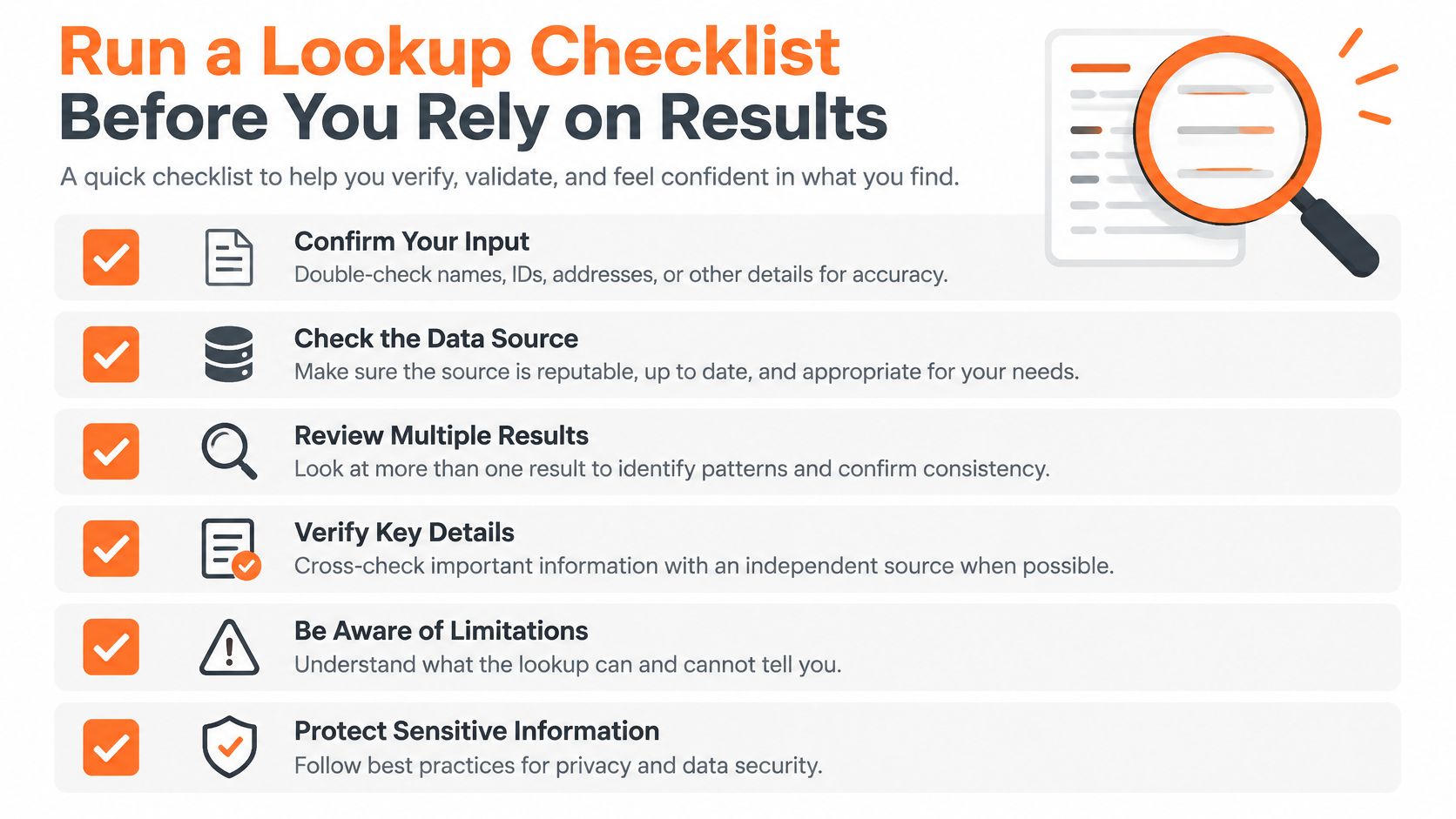
- Record the domain and the timestamp. Both, every time. A result without a timestamp can't be compared to anything later, and comparisons are where the information lives.
- Pull the registration fields. Note redaction markers and which server answered, because a WHOIS fallback and an RDAP response are not the same quality of evidence.
- Resolve A, AAAA, CNAME, MX, NS and TXT. Capture the TTL on each. Skip the record types you don't need only after you've confirmed they don't change the picture.
- Compare the two nameserver views. Registrar-reported nameservers against the nameservers answering DNS. A gap is a change in progress, not necessarily a problem.
- Confirm the store evidence. Platform, live storefront, and the tracking pixels on the homepage. A domain pointing at a platform isn't the same as a store that loads and sells.
- Review the advertising fields. The start date, the live ad count and the signal, plus when the data was last refreshed. Our free brand lookup accepts any store's domain and returns when it started advertising, its live ads and its channels, which makes this step a single query rather than three.
- Mark what's unresolved and choose one outcome. Proceed with outreach, hold, or verify further. Write down which it is, because "probably fine" is how bad lists get built.
Steps 5 and 6 follow the same store and advertising method each time, so the evidence you capture in March looks like the evidence you capture in September and can be compared directly.
The decision each outcome supports
Two independent sources that agree are enough to act. One source alone isn't a finding, however clean it looks, and a mismatch that survives the TTL is a reason to hold rather than a reason to explain it away.
The closing rule: no single field decides the question. Registration points at a company, DNS points at a host, and advertising points at behavior. You need at least two of them telling the same story before you spend money or reputation on the answer.
AdvertiserLeads tracks ecommerce brands through changes in their Meta and Google advertising activity, connecting each advertiser to a confirmed store so the behavioral layer in this guide is a query rather than a research project. Drop any store domain into the free brand lookup to see when it started advertising, how many ads are live and which channels it uses, then set that against the registration and DNS evidence you gathered. Visit AdvertiserLeads to run your first lookup.
Find brands that just started advertising
AdvertiserLeads checks the Meta Ad Library every day and flags ecom brands that just started, scaled or stopped their ads. Create a free account to see the live feed. No card.