Brand Name Lookup: How to Verify a Brand's Store and Ads
November 6, 2026
The World Intellectual Property Organization estimated 93.2 million active trademark registrations across 155 intellectual-property offices in 2024, up 6.1% from 2023, according to the WIPO World Intellectual Property Indicators 2025 highlights. That's why a clean brand name lookup in one database proves so little. The same name can be registered in another market, live on a different store, or appear in ads run by a different business entirely.
Treat the check as three separate questions. Is there a legal name conflict, is there a live store, and what does the ad behavior show? Each answer can disagree with the other two, and outreach built on only one of them wastes time or creates risk.
Table of Contents
- Pick the Right Lookup for Your Starting Input
- How to Run a Name Lookup in Five Stages
- Judge Whether a Similar Name Is a Real Conflict
- Confirm the Store Behind the Brand
- Read Ad Activity Without Overreading It
- Confirm the Brand Before You Reach Out
Pick the Right Lookup for Your Starting Input
Start from the input you already have, because each input has one correct first check. Don't run a domain tool on a bare name or a trademark search on a store you haven't confirmed exists. Read the last column first, since no single source proves a brand is legally free to use or currently trading.
| Starting input | First check | What it confirms | What it cannot confirm |
|---|---|---|---|
| Brand name only | Trademark database search in each target market | Registered marks with the same or similar name | Whether the brand sells or advertises today |
| Store domain | Store and ad check on the domain | The domain is a live store and has an ad history | Trademark status or legal rights to the name |
| Advertiser name from Meta Ad Library | Advertiser page in Meta Ad Library | Active ads, start dates and creative | Store ownership or sales volume |
| Advertiser from Google Ads Transparency Center | Advertiser page in Google Ads Transparency Center | Advertiser identity, regions and creative | Profitability or ad budget |
| Social handle | Platform profile and linked website | Account is claimed and which domain it links to | Trademark rights or an active store |
Repeat the Trademark Check per Market
A name that's free in one market can be registered in another, so the trademark search has to run in every country where you'll sell. A social handle or an available domain doesn't change that. Both only tell you who claimed an identifier on one platform.
Log which input you started with, along with the date and source. Every later conclusion builds on that starting point, and you'll need it when two businesses share a similar name.
Note the scope limit on domain tools. Our free brand name lookup works from store domains and we cover US brands only, so brands outside the US need the trademark, store, and ad library checks first.
How to Run a Name Lookup in Five Stages
A single exact-match query isn't clearance. In the EU, the EUIPO similarity tool for comparing goods and services works across the 45 classes of the Nice Classification and rates specific goods and service pairs as identity, high similarity, similarity, low similarity, or dissimilarity. That level of detail is the point. Likelihood of confusion depends jointly on sign similarity, goods and services similarity, the relevant public, and the earlier mark's distinctiveness.
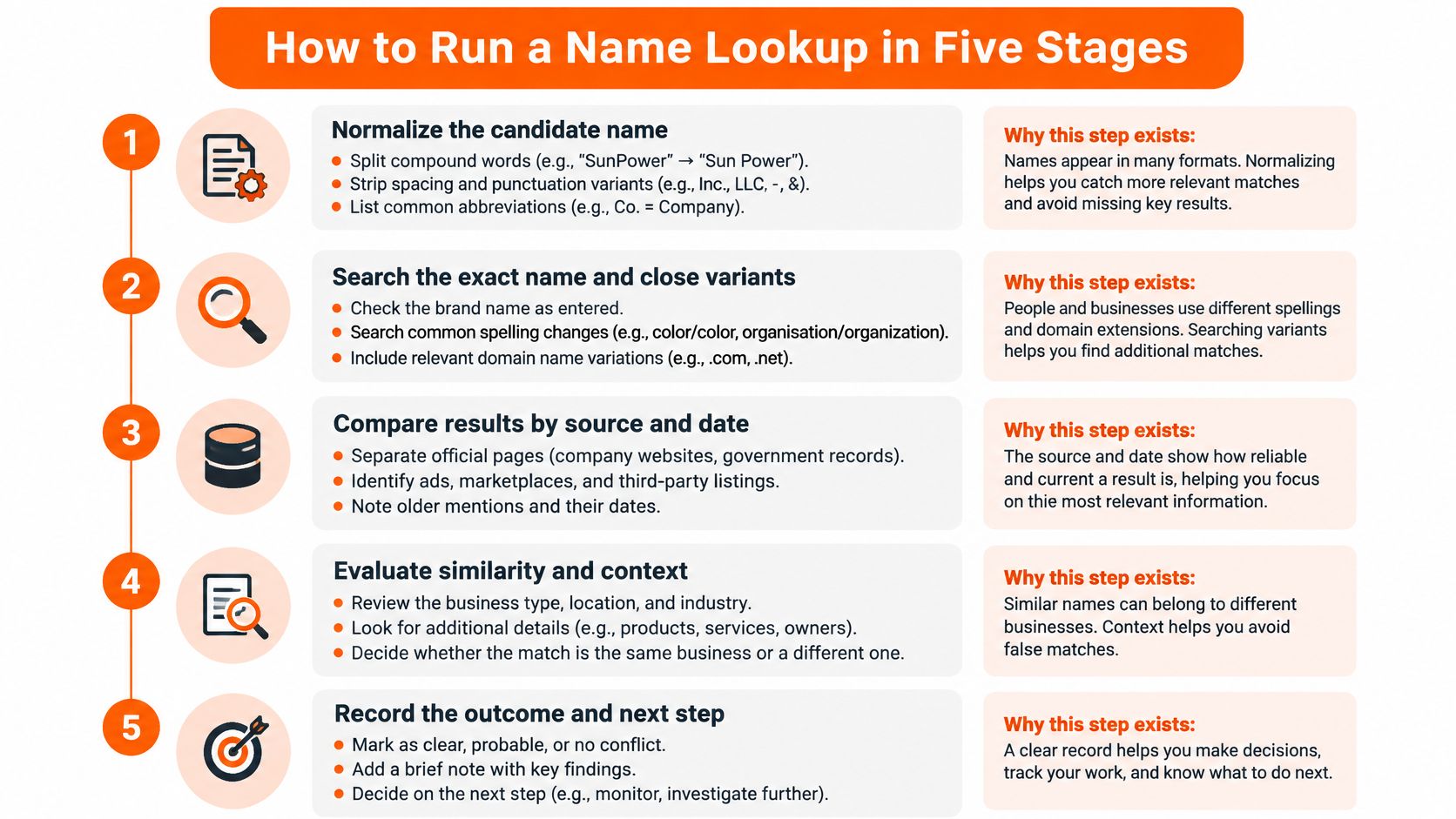
Normalize the candidate name. Split compound words, strip spacing and punctuation variants, and list pronunciation, abbreviations, translations, and likely misspellings. This stage exists because shoppers and examiners don't search the way databases store names. The common slip is searching only the stylized spelling on the logo.
Search official trademark databases in every launch market. Check exact matches, phonetic equivalents, visually similar spellings, and marks containing the dominant word. Searching one country only is the usual failure here. A clear result at home tells you nothing about the next market.
Compare each relevant record properly. Look at the goods or services claimed, the geographic market, status, and filing or priority dates. Compare the actual specification wording, not just broad class numbers, because two marks in one class can cover unrelated products while marks in different classes can still overlap commercially.
Log every hit. Record the database, jurisdiction, serial or registration number, owner, status, classes, and a record link or identifier. A log you can't retrace in six months isn't evidence. It's a memory.
Escalate close results to trademark counsel. Keep notes on searches that found nothing, too. No match found isn't the same as clearance, and counsel needs your search trail to judge the gap between the two.
What a Finished Log Looks Like
You've covered every market you plan to enter, recorded each hit with its status, and marked clearly what goes to counsel and what you're closing. Nothing sits in an unlabelled middle state.
A domain, social handle, or store lookup helps with identity resolution. It does not establish trademark availability or freedom to operate.
Keep those identity checks in the file, but label them for what they are. They tell you which business you're looking at. They don't tell you whether you can use the name.
Judge Whether a Similar Name Is a Real Conflict
Don't reduce similarity to a percentage. The EUIPO guidance on degree of similarity states that no single similarity factor is generally sufficient, that the combined weight of multiple factors determines the conclusion, and that mathematical analysis cannot replace case-specific assessment. Build a matrix instead and score each candidate on evidence.
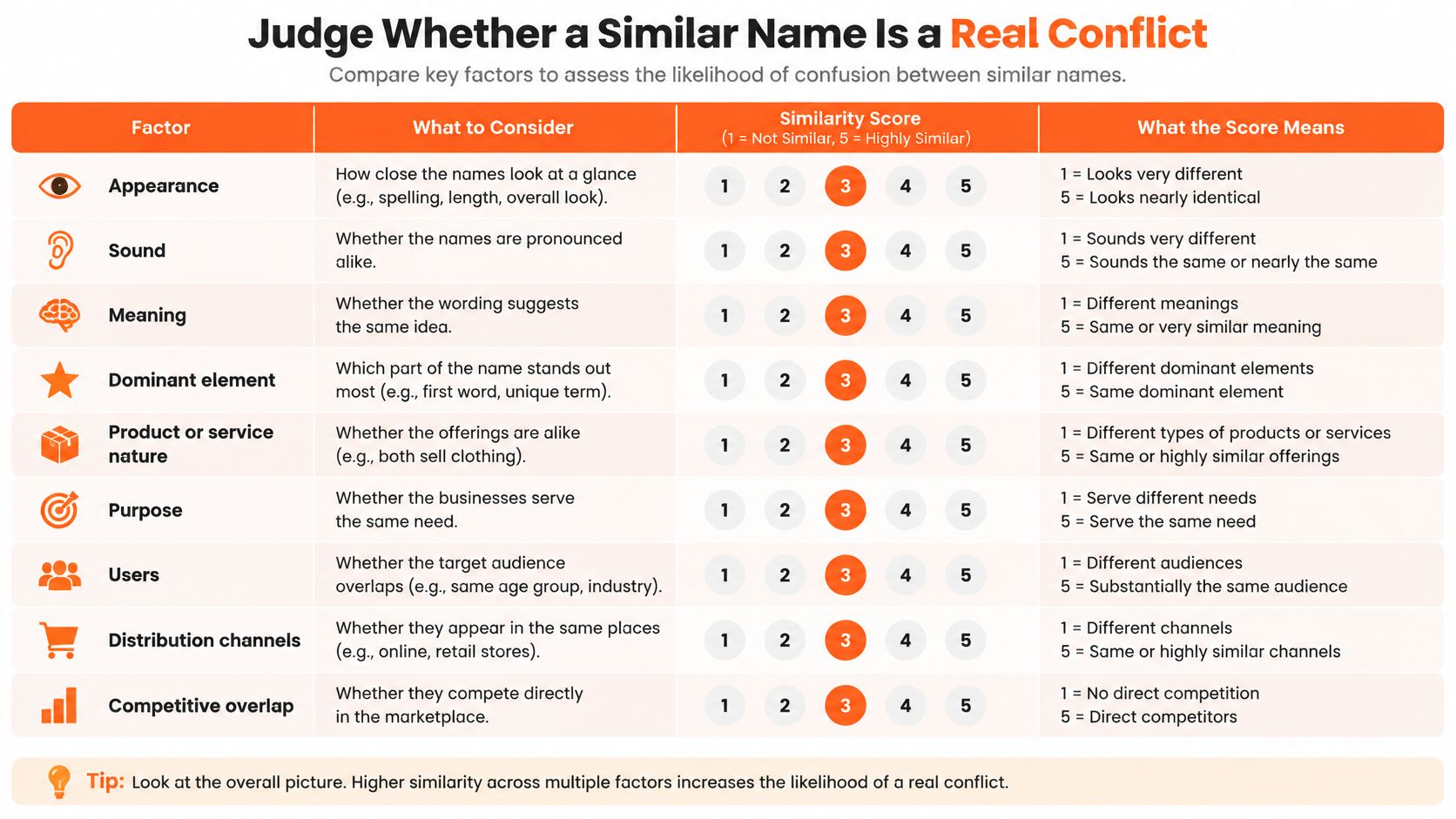
Cover appearance, sound, meaning, and dominant elements for the signs themselves. Then cover product or service nature, purpose, users, distribution channels, competitive relationship, and geographic overlap for the commercial context. That second half is where most quick checks go wrong, and it's the same discipline you'd apply in broader ecommerce market research before committing budget.
| Priority | Sign similarity | Goods or services overlap | Next action |
|---|---|---|---|
| High | Identical or near-identical | Overlapping goods or services | Escalate to trademark counsel before launch |
| Medium | One strong dimension with several context matches | Partial overlap | Review specification wording and each market |
| Low | Clearly distinct | Separate commercial fields | Record the search and move on |
A Worked Example
Say a store called Bramblo sells home candles, and a registered mark BRAMBLO covers skincare. The signs are near-identical, so that dimension is strong. The goods differ, which pulls the other way. That combination lands at medium priority, not low.
Your next move is specific. Check whether the skincare mark is still active, and read its specification for anything a candle seller would plausibly offer, such as home fragrance or body products. If the specification reaches into scented home goods, the priority rises.
Watch for the recurring failure modes in every launch market. Operators search one jurisdiction, ignore dead or abandoned filings that may still signal prior use, overlook transliterations and phonetic equivalents, and compare class numbers instead of specification wording. Check unregistered-use evidence as well, including marketplace listings, company registries, app stores, and search results. Record positive and negative evidence side by side so the file shows why each result was ruled in or out.
Confirm the Store Behind the Brand
Start with the domain and the fastest technical check you've got. On a Shopify store, the public product feed at /products.json returns the catalog as JSON. A populated product list with prices is a strong sign of a live catalog. An empty or missing feed points to a non-Shopify build or a stalled store, so don't treat it as proof either way on its own.
Check response headers and page source for platform markers next. Recognized ecommerce platform markers tell you how the store is built. They don't tell you whether anyone is running it, which is why the remaining checks matter. We run this the same way. Every landing domain in the ads we see gets a store check using Shopify's /products.json endpoint and response headers, then markers on the homepage.
| Check | Where to look | Healthy sign | Red flag |
|---|---|---|---|
| Product catalog | /products.json on Shopify stores | Populated product list with prices | Empty or missing product feed |
| Platform | Response headers and page source | Recognized ecommerce platform markers | No platform markers and a generic build |
| Legal pages | Footer links | Refund, privacy and terms pages with business-specific text | Missing pages or copied policy text |
| Business identity | About and contact pages | Named company and a physical or registered address | Only an anonymous contact form |
| Checkout | Product page add-to-cart | Cart and checkout respond normally | Cart fails or redirects to a broken page |
Read the Four Checks Together
A full catalog, named company details, business-specific refund and privacy pages, and a working add-to-cart describe a real operator. Any one of those can be faked or copied. All four together are harder to fake and quick to verify.
The opposite pattern should stop you. A placeholder about page, copied policy text, no named company, and a broken cart is a red flag even when the ads look polished. Creative is cheap to produce. A functioning store with real policies takes ongoing effort.
Practical rule: Judge the store on whether a customer could buy something today and find out who took their money. If either answer is unclear, you don't have a confirmed operator yet.
A store can also be real but dormant. Products sit listed, checkout works, and nobody has touched the business in months. That distinction is exactly what the ad check resolves.
Record the domain, platform, catalog size, a dated screenshot of the homepage, and the business name as the site states it. The stated name is what you'll match against advertiser records and trademark owners later.
Read Ad Activity Without Overreading It
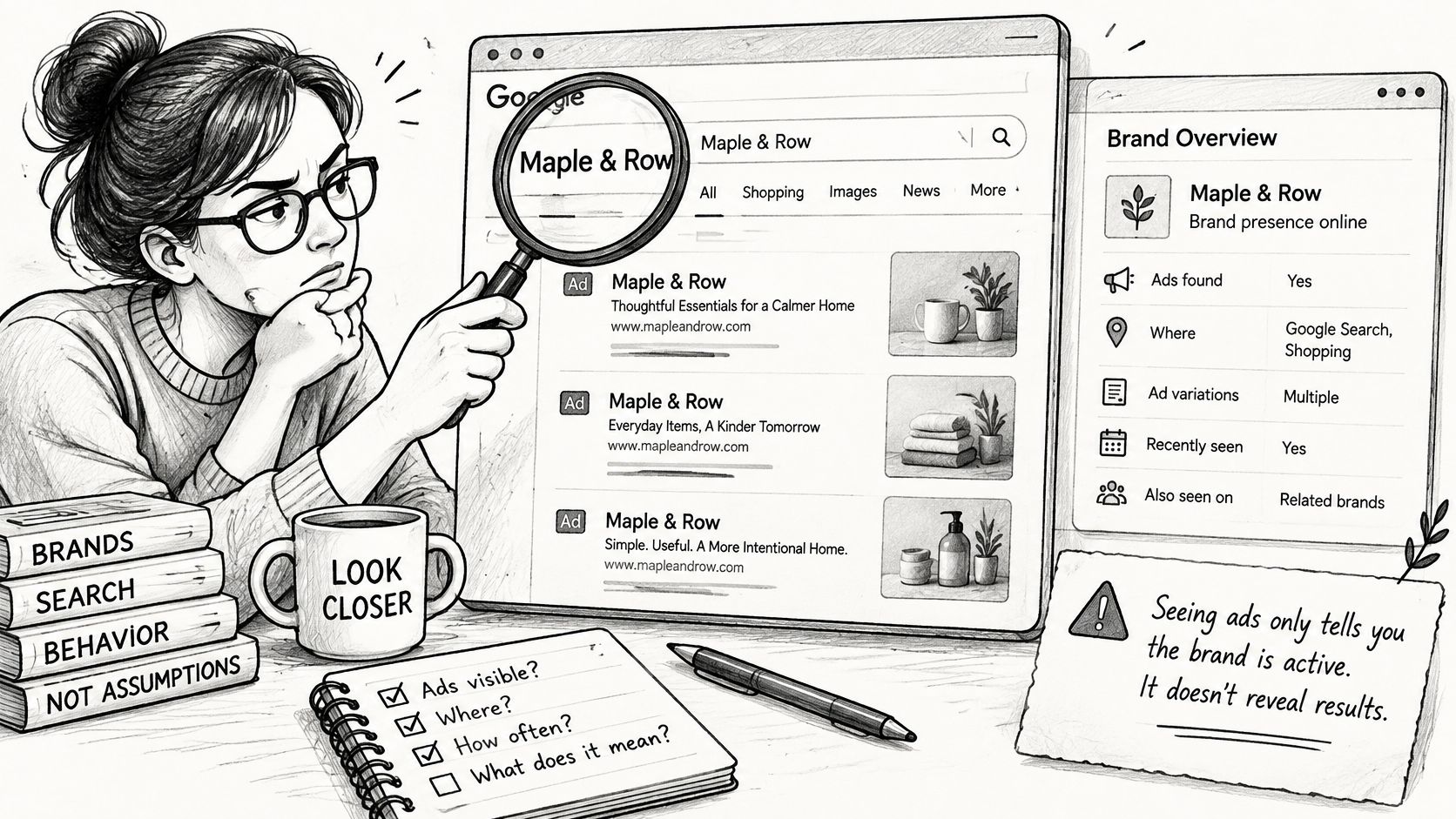
A live ad doesn't mean a healthy business. Ad transparency tools now show more about where and how ads run, but more disclosure still doesn't turn an ad into proof of sales, profitability, or budget. Ad presence is an observable behavior signal, nothing more.
The image below shows the kind of close reading an advertiser page needs before you draw any conclusion from it.
Search the brand name or domain in Meta Ad Library and open the advertiser page. Then search the same name in Google Ads Transparency Center to see whether the advertiser is active there too. Record the earliest ad date first, because that single date does more work than any creative screenshot. In our checks a brand earns the just started label only if its earliest Meta ad was found in the last 14 days, and brands with older ads don't count. Brand checks run each morning and new advertisers are flagged in the afternoon (UTC), after checking they have no older ads that Meta still lists. Coverage is US brands only.
Count live ads, not total ads, and compare the count across two or three weeks. A climbing count can mean scaling, but it can also be a test batch. Many short-lived launches with few ads surviving past two weeks is the pattern we label struggling, a pattern worth comparing against how established DTC beauty brands sustain creative. A drop from active ads to zero reads as stopped, but it can also be a paused campaign rather than a closed business, so check the store before concluding anything.
The short walkthrough below shows how to read start dates and live counts on an advertiser page.
Answer three questions before writing any note. When did it start, what changed since, and does the store still look operational? An ad may also come from a test, a recurring campaign, a marketplace seller, or a payer who isn't the beneficiary, so confirm the advertiser is the ecommerce operator behind the store. Ad behavior is one of three answers a name check gives you, and it can disagree with the other two: a brand can have a conflict-free name, run a live store, and still show activity that says the timing is wrong.
Confirm the Brand Before You Reach Out
Make a go or hold call before you look for a contact. Go when the store is confirmed as a live operator, the earliest ad date and live ad count are logged, the trend is clear, and the trademark check shows no close conflict or has counsel sign-off. Hold when the store is missing, the name sits close to a registered mark in a relevant class, or the ad history is too thin to say anything.
A free domain doesn't make a name usable. Trademark similarity and category overlap create the greater long-term risk, so a domain check alone is never the answer, a point that matters as much in ecommerce lead generation as it does in naming your own store.
- Confirm the store is live and trading.
- Record the first ad date and live ad count.
- Log the trademark search and its outcome.
- Look for a contact only after those three steps.
Our free brand name lookup lets you enter any store's domain to see when it started advertising, its live ads, and its channels, and you may use the data to research and contact brands for your own business. We don't include contact details, so export brands to CSV and find the right person with tools such as Clay or Apollo. Outreach that cites a verified store and a dated ad change lands better than outreach built on a guess.
Enter a store domain at AdvertiserLeads to run a free brand lookup showing when that brand started advertising, how many ads are live, and which channels it uses. Pair that with your store confirmation and trademark log, and you'll know whether a brand is worth contacting today or worth holding.
Find brands that just started advertising
AdvertiserLeads checks the Meta Ad Library every day and flags ecom brands that just started, scaled or stopped their ads. Create a free account to see the live feed. No card.