SaaS Facebook Ads: How to Plan, Launch and Measure
November 3, 2026
Your dashboard says cost per trial is falling. Your billing system says it isn't finding new paying accounts. Sales, meanwhile, is complaining that demo bookings look busier but show up less often and activate less after they sign.
That's the normal starting point for SaaS Facebook Ads, not a sign you've broken something unusual. Meta optimizes for the event you hand it, in the window you hand it, with the matching quality you've built. If that event is a cheap trial start, you'll get cheap trial starts. Treat platform reported ROAS and CPA as hypotheses, not as revenue. Your job is to reconcile them against activation and billing, then pick the optimization event that matches what you sell.
Table of Contents
- Map Your SaaS Funnel to Facebook Campaign Goals
- How to Set Up Tracking Before You Spend
- How to Structure and Run Your First Test
- Why Good-Looking Campaigns Fail Quietly
- Measuring Revenue Beyond Platform Reports
Map Your SaaS Funnel to Facebook Campaign Goals
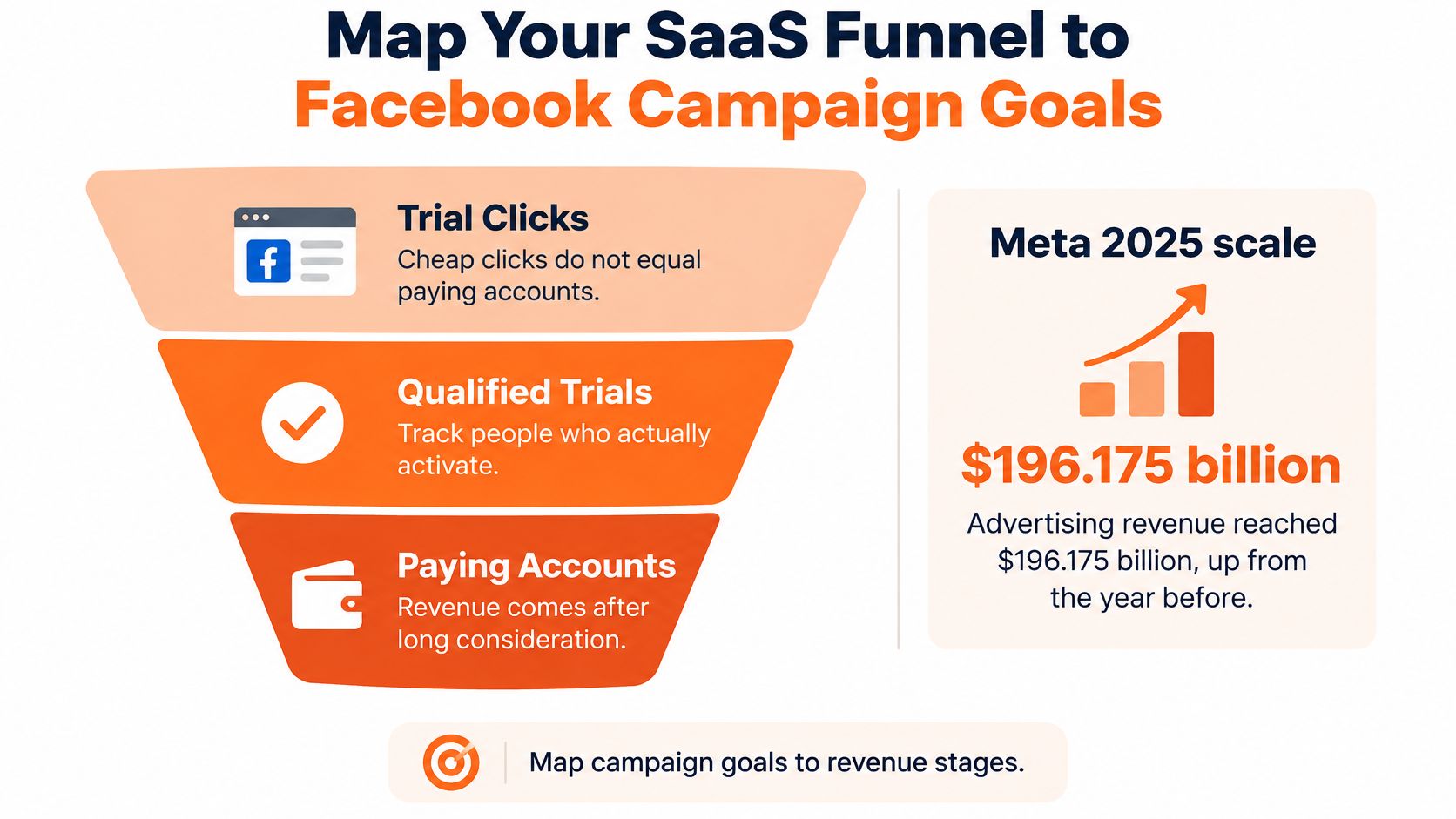
The most expensive mistake is simple. A team buys cheap trial clicks, celebrates a lower CPL, then wonders a month later why paying accounts didn't follow. The clicks were real. The buyers mostly weren't.
You're advertising inside a large, expensive auction, not a bargain inventory pool. Meta's 2025 filing with the SEC reported $196.175 billion in advertising revenue in 2025, up 22% from 2024, with advertising impressions across its Family of Apps up 12% and average price per ad up 9%. Reach exists. Cheap reach as a durable edge doesn't. Performance now turns on creative, audience quality, tracking, and whether your lifetime value can support the price of attention.
Match the Event to the Money
Start by naming one funnel goal per campaign. Don't run one campaign and expect it to prove awareness, trials, and revenue at once.
| Funnel goal | Meta objective | Optimization event | Judge the campaign by |
|---|---|---|---|
| Demo bookings | Leads | Schedule (demo booked) | Cost per booked demo and show-up rate |
| Free trial starts | Leads or Sales with a trial event | StartTrial custom conversion | Cost per trial start and trial-to-paid rate |
| Paid subscriptions | Sales | Purchase sent server-side with plan value | Cost per paying account and first-month retention |
| Activated accounts | Sales with custom event | Activation event sent server-side | Cost per activated account |
| Creative screening only | Traffic or Awareness | Landing page view | Not for CAC; use only to shortlist hooks |
Read the last column before you launch. If you can't measure show-up rate, trial-to-paid rate, or activation, you're not ready to judge that campaign, however tidy the Ads Manager view looks. Teams that borrow thinking from structured ecommerce lead generation sometimes make the same error in reverse, importing a volume mindset into a subscription funnel where quality shows up weeks later.
Practical rule: Optimize for the lowest-funnel event that still gives the ad set enough weekly volume to learn. Go deeper only when volume holds, and go higher only when you accept that you're buying a proxy.
Say a project tool gets enough trials each week in one ad set. It can optimize for StartTrial directly and judge success by activation and conversion to paid. Say a developer tool only gets a handful of trials a week. Forcing optimization on Purchase will starve delivery, so I'd either send a well-defined downstream event server-side when it happens and accept slower learning, or optimize on a higher-volume proxy that correlates tightly with activation, such as completing workspace setup. What I wouldn't do is optimize on a page view and report it internally as acquisition progress.
Write the Ceiling Before You Write the Ad
Do the payback math on one page before anyone opens Ads Manager.
Take a hypothetical plan at $300 monthly contract value with 80% gross margin. That's $240 of gross profit a month. If your payback target is six months, you can spend $1,440 to acquire one paying account. If your trial-to-paid rate in that example is 20%, your ceiling is $288 per trial start, because five trials produce one customer.
- Monthly contract value: What a typical new account pays, not list price for your largest plan.
- Trial-to-paid or demo-to-paid rate: Pulled from recent cohorts, segmented by self-serve versus sales assisted if both exist.
- Payback target: The months finance will accept before gross profit covers CAC.
Write those three numbers beside the table row you're using. Every optimization event should have a number it must beat, and every scale decision should be forced to clear it. If a campaign hits your trial ceiling but activation collapses, it hasn't hit your ceiling at all. It's bought the wrong trials cheaply.
How to Set Up Tracking Before You Spend
Don't spend to learn whether your tracking works. You'll pay for the lesson twice, once in media and once in bad optimization signals that train delivery toward whoever your broken setup can see.
A usable SaaS setup combines browser events from the Meta Pixel with server events from the Conversions API, sent to the same dataset. Meta's Conversions API documentation states that server events can support measurement, attribution, and delivery optimization similarly to Pixel events, while correctly shared event IDs prevent duplicate counting. It also warns that only matched events can be used for attribution and ad delivery optimization, whereas unmatched events provide only basic measurement.
The Six Steps in Order
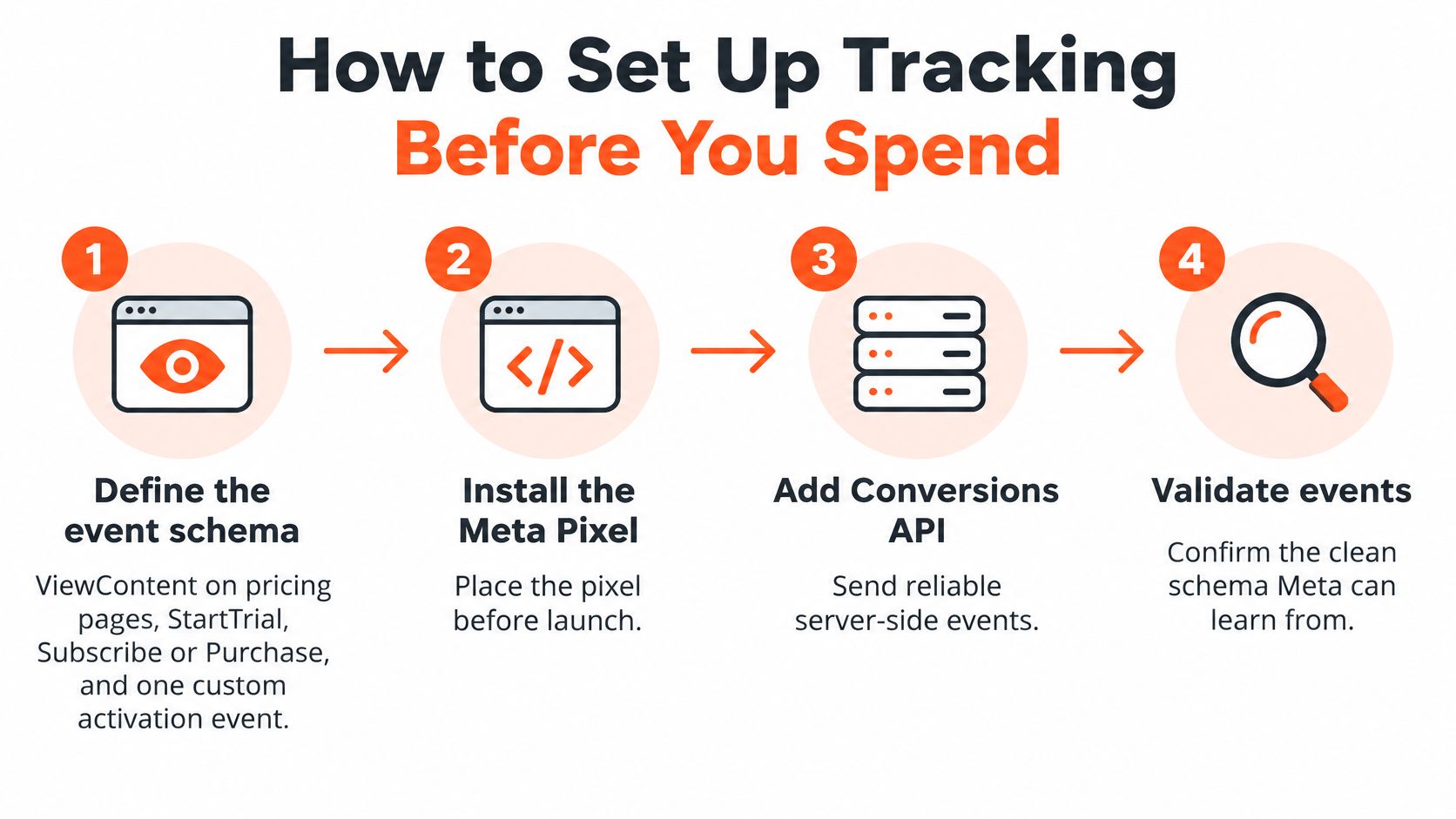
Define the event schema first. Use ViewContent on pricing pages, StartTrial at trial creation, Subscribe or Purchase at paid conversion, and one custom activation event tied to a real product milestone. Meta can learn from a clean, stable schema. It can't learn from twelve near duplicate events invented by different teams.
Install the Pixel on signup, pricing, and checkout pages. The browser layer catches on-site behavior quickly and supports retargeting pools. The common slip is relying on it alone, which loses events to blockers and iOS restrictions.
Add the Conversions API for the events that matter. Send trial, purchase, and activation events from your server, where your billing and product systems already know they happened. Server-side sending is especially important for delayed SaaS outcomes, such as a trial converting on day nine when the original browser session is long gone.
Generate one identical event_id for each browser and server pair. This is the deduplication key. If each side invents its own ID for the same trial, Meta can count it twice, inflate conversions, and make your CPA look better than reality. Check that event_name matches exactly too. StartTrial and start_trial aren't interchangeable for this purpose.
Log everything in your own database. Store event_id, event_name, event_time, dataset ID, currency, value, order or account ID, landing page URL, click identifiers, and delivery status. You'll need that log the first time Ads Manager, your CRM, and billing disagree, which they will.
Validate in Events Manager before optimizing. Check delivery, deduplication rate, event match quality, and whether purchase totals agree with billing. An accepted API call isn't proof of usable attribution. Accepted events can still fail identity matching or remain ineligible for optimization.
Consent, Hashing, and the Quality Gate
Send additional permitted customer information parameters only after consent and hashing requirements are satisfied. Better matching helps, but stuffing parameters you don't have a basis to send creates compliance risk and messy data. I'd rather have fewer, cleaner parameters sent consistently than a maximal payload that engineering can't explain.
Don't treat HTTP success as your quality gate. Your gate is operational.
- Deduplication is stable: Browser and server events pair up instead of stacking.
- Purchase totals reconcile: Meta purchase value tracks billing closely enough that remaining variance has a known cause, such as attribution timing.
- Match quality improves or holds: It doesn't slide after a site release, a consent banner change, or a checkout update.
- No orphan events: Every optimization event in Events Manager exists in your internal log with an account or order ID.
After about three days of real traffic, a healthy setup should let you pick any trial in your CRM and find its matching event_id, its value if it paid, and its delivery status without asking anyone to guess.
If you can't do that trace, pause. Fixing schema, IDs, and logging is cheaper now than relearning a campaign later on contaminated signals. Good tracking doesn't guarantee good campaigns. Bad tracking nearly guarantees you'll misread average ones.
How to Structure and Run Your First Test
A first test should answer one commercial question clearly enough for finance to understand. Can this angle generate activated trials or qualified demos within our budget? You are not proving Facebook works in general.
Sequence matters. Meta's Conversions API best practices distinguish event receipt from successful matching, attribution, and optimization eligibility, which is why tracking validation should stay separate from creative and audience experimentation. If both change at once, you won't know whether performance moved because the hook improved or because deduplication broke.
Build One Readable Test
Pick one primary conversion event. Define it in business terms too. A trial counts when an account is created. A qualified trial counts when it reaches your activation step. A demo counts when it's booked, and a useful demo counts when the prospect shows up. Write both definitions down because you'll report both.
Hold everything else constant. Keep budget, attribution window, landing page, and audience structure stable while you test one major variable, such as one pain-point hook against another. Changing the page on day three because someone prefers new copy destroys the read.
Build three to five creatives per angle. That gives delivery real choice without slicing budget so thin that nothing learns. Before building, review what competitors are running with a Facebook Ad Library scraper so your angles respond to live market claims instead of internal guesses. Our free tool lets you paste an Ad Library search and export it to CSV.
Size budget from the event backward. Run the arithmetic before launch. Say, for illustration, a trial costs you $40 and you want roughly 50 optimization events in a week for one ad set. That ad set needs about $2,000 a week. If you can't fund that volume, don't pretend a $300 test on Purchase will tell you anything. Move one step up the funnel or narrow the test to fewer ad sets.
Don't edit during learning. Budget changes, audience changes, and creative swaps can restart learning and muddy comparisons. If an ad is broken, fix it. If it's merely unfashionable on day two, leave it alone.
Predeclare the evaluation window and decision rule. For example, judge after 14 days or after your target event volume, whichever comes later. Decide in advance what cost per activated account triggers scale, iteration, or shutdown. Rules written after results arrive tend to flatter whoever's presenting.
Guardrails That Keep the Signal Clean
Report the immediate conversion and the downstream outcome together. For subscription SaaS, that means trial or demo volume alongside paid activation, retention, or qualified pipeline value. If you send Meta only top-of-funnel leads, the system will find more people who submit forms cheaply. Sending verified downstream outcomes server-side gives optimization a closer representation of business value.
- Retarget pricing viewers separately: They've shown stronger intent than blog readers and shouldn't share a budget pool or a message with them.
- Exclude existing customers from prospecting: Paying to reacquire your own users inflates conversions if they log in and trigger events.
- Delay lookalikes until the seed is good: Build from paying accounts once you have enough matched users, not from every trial signup including students and competitors.
- Keep one landing page per test: A page change is a variable. Treat it as one in a later test.
Use campaign reporting plus an independent source, your CRM or product analytics, every time. Document platform versus CRM variance instead of forcing the numbers to match. A persistent gap is information about matching, timing, or attribution. A reconciled spreadsheet that someone adjusted to agree is just fiction with formulas.
A readable test has one variable, a stable budget, a predeclared window, and a result you can explain to finance in two sentences.
If you can't meet that standard yet, shrink the ambition. I would run one angle well rather than four angles that each produce anecdotes. Scale is a reward for a clean read, not a substitute for one.
Why Good-Looking Campaigns Fail Quietly
A campaign can improve on every visible metric and get worse where it counts. Cheaper clicks feel like progress because they're immediate. Activation, retention, and payback arrive later and contradict the celebration.
Chamber Media's analysis of $110 million in ecommerce Meta ad spend found that after the platform's Andromeda-era changes, click-through rate rose 9% and cost per click fell 6%, yet click-to-purchase conversion declined 23%, cost per purchase increased 22%, and platform-attributed ROAS fell 26%. That's ecommerce data, not SaaS, and you should keep that scope in mind. The SaaS translation is familiar though. Traffic gets cheaper, trials get weaker, activation drops, and accounts churn before payback.
Diagnose by Symptom, Not by Opinion
| Symptom | Likely cause | Fix |
|---|---|---|
| CTR and CPC improve, trials stay flat | Platform finds cheaper clicks with low intent | Optimize for trial start and add a qualifying question to the form |
| Pixel leads far above CRM signups | Duplicate events or unmatched server events | Check event_id deduplication and match quality in Events Manager |
| Platform ROAS looks strong, finance sees little new revenue | Attribution window or view-through credit overstates impact | Reconcile against billing and run a holdout before scaling |
| CPA climbs after week two | Creative fatigue or edits during learning | Refresh creatives in the winning angle and stop editing for the learning period |
| Spend is steady but few conversions arrive | Event too rare to learn from | Optimize one step higher in the funnel until volume reaches about 50 events a week |
Use the table as a triage order. If pixel leads dwarf CRM signups, don't debate creative. Fix event plumbing. If finance sees no revenue while the platform reports strong returns, don't buy more of the same attribution. Test incrementality. If conversions are too rare, changing headlines won't create statistical signal that isn't there.
Some fixes land in one review cycle. Correcting a duplicated event or adding an exclusion can clean reporting quickly. Others need a full learning period and a fresh cohort to judge, especially when you move the optimization event or refresh an angle after fatigue. Mixing those timelines up causes teams to abandon sound fixes early and keep broken ones too long.
Give Creative a Business Stopping Rule
More creative volume helps delivery find attention. It doesn't guarantee the attention belongs to future customers. I'd judge creative in cohorts.
Build one view by creative and audience with signup-to-activation rate, sales acceptance where relevant, trial-to-paid rate, payback period, and early retention. A video with a modest CTR that produces activated workspaces beats a thumb-stopping hook that produces curious clicks and empty accounts. If a creative wins on CPC for two weeks but its cohort activates at half your baseline, that's your stopping rule. Kill it or restrict it to cheap screening where it can't claim acquisition budget.
Declining CPC can be a warning sign when the platform is finding easier clicks instead of higher-intent prospects.
Automation makes this discipline more important, not less. Broad delivery will exploit whatever signal you reward. Reward form fills and it'll find form fillers. Reward activated accounts, with enough volume to learn, and you give it a harder but more valuable problem.
Before any scale-up, ask one question. Are the new people we're paying for more likely to activate than the last group? If nobody can answer from cohort data, you're not scaling a result. You're scaling a hope with a larger invoice.
Measuring Revenue Beyond Platform Reports
SaaS revenue rarely arrives neatly inside an attribution window. A click can precede payment by weeks or months when there's a free trial, an annual contract discussion, a security review, or several stakeholders. That lag is exactly where dashboard confidence breaks down.
The image below traces that non-linear path from first click to subscription revenue.
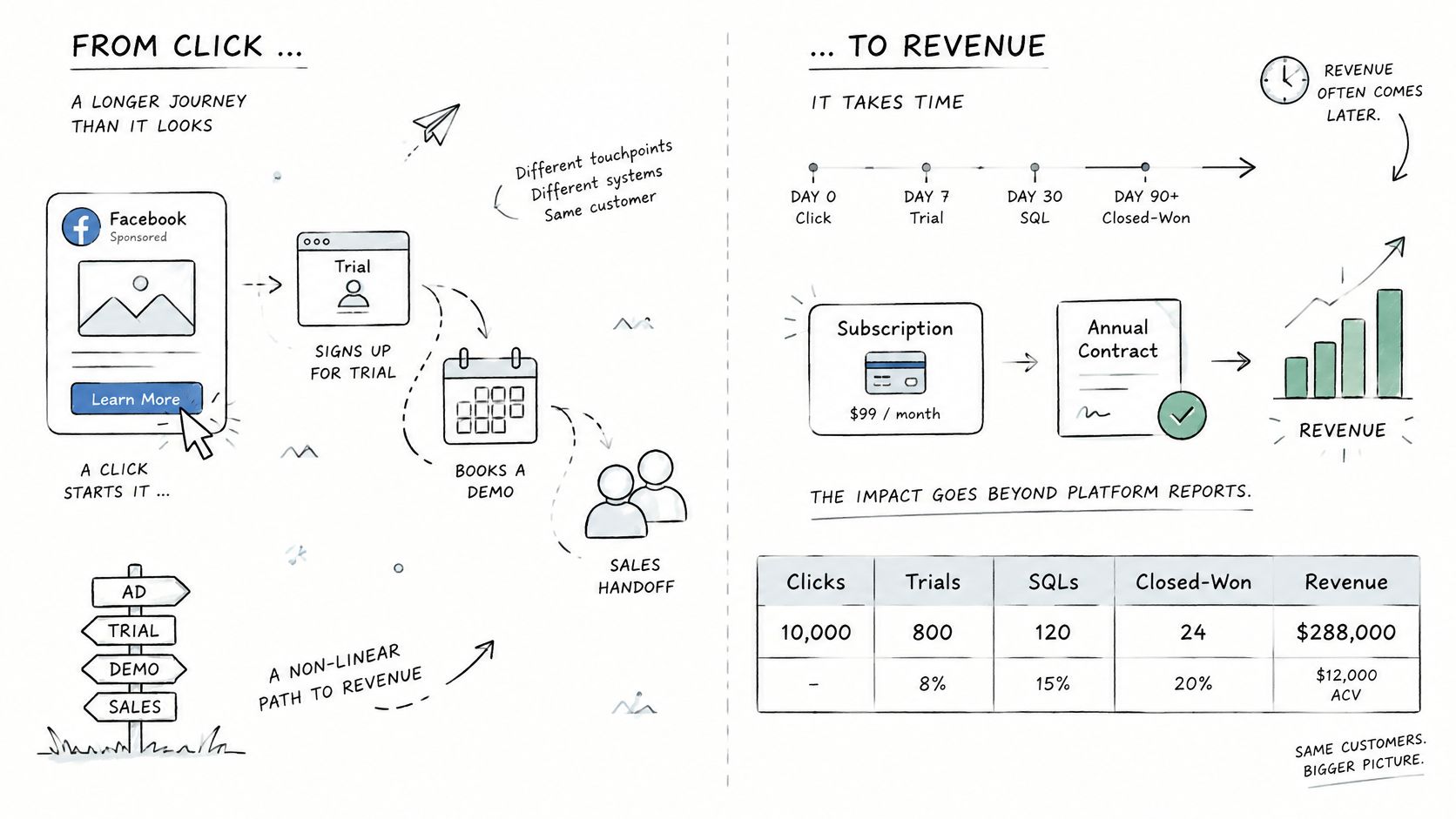
Platform reporting still has a job. It tells you what Meta credited, how delivery behaved, and whether optimization signals are flowing. It doesn't prove causality. Reportei's overview of new Meta Ads metrics describes Meta's move toward machine-learning and aggregated measurement as iOS privacy restrictions and fragmented journeys create differences between Meta, Google Analytics, and CRM results. Better event capture can sharpen optimization while still overstating the revenue Facebook caused.
Reconcile Each Metric Against Its Real Owner
| Metric | Platform report | Check against | Watch for |
|---|---|---|---|
| Trial starts | Lead or custom conversion count | CRM trial records | Double counts when pixel and API IDs differ |
| Paid conversions | Purchase count and value | Billing system | Lag between click and payment on annual plans |
| Activation rate | Not reported natively | Product analytics | Needs a server-sent activation event |
| Incremental revenue | Not reported natively | Geo holdout or conversion-lift test | Platform credit overstates causal impact |
Notice the bottom two rows. Meta can't natively report whether users activated in your product or whether revenue was incremental. You have to supply the first with a server event and test the second experimentally. Teams researching measurement stacks, including those checking which stores run tools through lists like Shopify stores using Triple Whale, still face the same SaaS problem. Another dashboard doesn't answer causality without a design that isolates it.
The short video below is worth watching with that table open, because the sequence from click to paid account is where attribution picks up credit it may not deserve.
Escalate in Three Steps
Step one is weekly reconciliation. Compare trials and paid accounts from Meta against CRM and billing. Document the variance and its likely cause, timing, deduplication, matching, or attribution window. Don't force agreement. A stable, explained gap is manageable. A gap that widens after a release is a tracking incident.
Step two is a geo holdout when totals contradict attribution. If platform attributed revenue grows while total new revenue stays flat, pause Facebook in matched regions for about four weeks and compare trends against regions still running. Say a company reports $40,000 a month in Meta attributed revenue, purely as an illustration, but total new sales don't move during a regional pause. That pattern suggests attribution is claiming demand that would've arrived anyway.
Step three is a conversion lift test when budget justifies it. Use it when spend is material, sales cycles make last click implausible, or leadership is deciding whether Facebook deserves a permanent budget line. The threshold for escalating is practical. When a scale decision depends on revenue you can't see in billing, stop arguing about dashboards and run the experiment.
Optimize toward the event that matches the revenue you collect, and trust the holdout over the dashboard.
If you're building pipeline around paid social, AdvertiserLeads helps you find ecommerce brands by what's changing in their Meta and Google advertising, with daily signals for brands that just started, are scaling, struggling, or stopped, plus full ad history and store details on each profile. Use it to research advertisers, time outreach around real campaign changes, and build prospect lists you can export instead of manually rechecking ad libraries. Visit AdvertiserLeads to start with the free tools and see which brands are actively spending.
Find brands that just started advertising
AdvertiserLeads checks the Meta Ad Library every day and flags ecom brands that just started, scaled or stopped their ads. Create a free account to see the live feed. No card.